Surveys - Post-Conversation Agent Checklists in ConvyAI
Overview
Surveys are checklists presented to agents after a conversation with a customer is closed. They are shown after the contact result has been filled in (when contact result is enabled) and help agents follow a consistent post-interaction process.
A survey is associated with one or more queues and contains one or more ordered questions.
Create a survey
Navigate to ConvyAI Agents → Surveys and click New Survey.
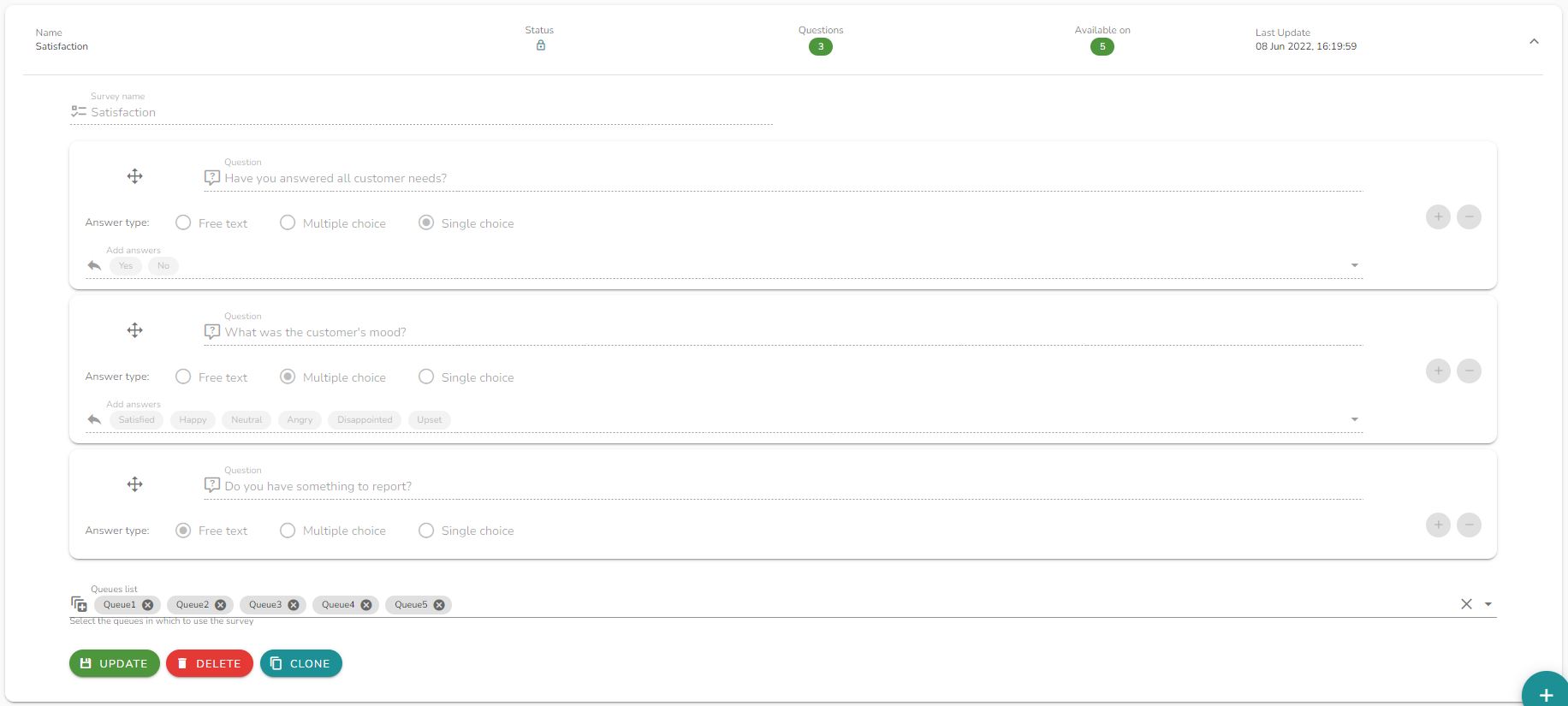
Configuration options
| Field | Description |
|---|---|
| Name | A unique name to identify this survey. |
| Questions | One or more questions, orderable by drag-and-drop. Each question has a type (see below). |
| Queue | One or more queues this survey is associated with. |
Question types
Each question can be configured with one of the following answer types:
| Type | Description |
|---|---|
| Free text | The agent types a free-form answer. |
| Single selection | The agent chooses one option from a predefined list. |
| Multiple selection | The agent can select more than one option from a predefined list. |
Edit and clone surveys
Once a survey is saved, the form is locked and no longer editable. This ensures consistency in reporting data - historical survey responses always match the question structure at the time they were collected.
To create a modified version, use the Clone button to generate an editable copy.
Notes and limitations
- Surveys are triggered after the conversation is closed and the contact result is submitted (when contact result is mandatory or optional and filled in).
- Reordering questions after saving is not possible - plan the order before saving.
- Cloning a survey does not duplicate the associated queue assignments; you must reassign queues on the new copy.