Permission Sets & Agent Roles in ConvyAI - Full Reference
What are permission sets
A permission set is a named collection of system permissions assigned to an agent account. It controls what the agent can see and do in the Agent Desktop. Think of it as a role.
Three permission sets are provided by default: Agent, SuperAgent, and Supervisor. These are always available, cannot be modified, and cannot be deleted.
Create a custom permission set
If none of the default sets fits your needs exactly, use the Clone button on any existing set to create an editable copy, then modify it.
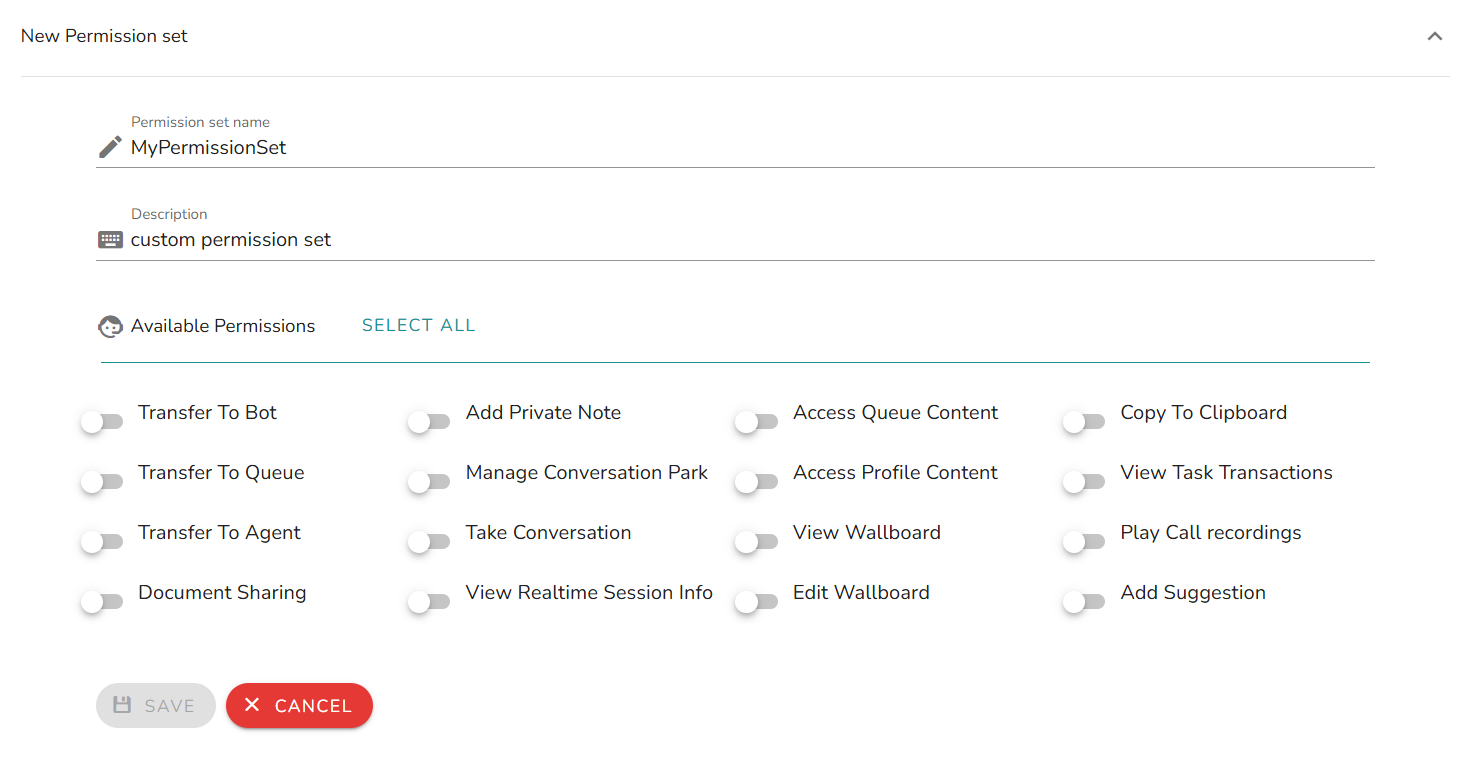
A custom permission set requires:
- A unique name.
- A description.
- One or more permissions selected from the list below.
Permissions reference
Permissions are divided into two groups.
Action permissions
Control what an agent can do with a conversation or while handling it.
| Permission | Description |
|---|---|
| Transfer To Bot | Transfer tasks to a specific bot. |
| Transfer To Queue | Transfer tasks to a specific queue. |
| Transfer To Agent | Transfer tasks to a specific agent. |
| Document Sharing | Send documents to the customer. |
| Add Private Note | Write private notes within a handled conversation (not visible to the customer). |
| Manage Conversation Park | Park and resume personal conversations. |
| Take Conversation | Take charge of conversations handled by other agents or queues. |
| Copy to Clipboard | Copy the full conversation to clipboard (attachments are copied as links). |
| View Task Transactions | View the transaction detail of tasks. |
| Play Call Recordings | Access and play recordings in the media repository section. |
| Add Suggestion | Add a suggestion as a private note while consulting the content of real-time conversations handled by queues' related agents. |
Visibility permissions
Control what an agent can see in the Agent Desktop.
| Permission | Description |
|---|---|
| View Realtime Conversation Content | Peek through the content of real-time conversations, both personal and those handled by queues' related agents. |
| Access Queue Content | Monitor live conversations currently in queue. |
| Access Profile Content | Monitor conversations related to the queues associated with the agent's personal profile. |
| View Wallboard | Access the Wallboard section with personal widgets. |
| Edit Wallboard | Customize the Wallboard section with additional widgets. |
Default permission sets
The table below shows the permissions included in each default set.
| Permission | Agent | SuperAgent | Supervisor |
|---|---|---|---|
| Transfer To Bot | ✔ | ✔ | ✔ |
| Transfer To Queue | ✔ | ✔ | ✔ |
| Transfer To Agent | ✔ | ✔ | ✔ |
| Document Sharing | ✔ | ✔ | ✔ |
| Add Private Note | ✔ | ✔ | ✔ |
| Manage Conversation Park | ✔ | ✔ | ✔ |
| Take Conversation | ✔ | ||
| Copy to Clipboard | |||
| View Task Transactions | ✔ | ✔ | |
| Play Call Recordings | ✔ | ||
| Add Suggestion | ✔ | ✔ | |
| View Realtime Conversation Content | ✔ | ✔ | ✔ |
| Access Queue Content | ✔ | ✔ | |
| Access Profile Content | ✔ | ✔ | |
| View Wallboard | ✔ | ✔ | ✔ |
| Edit Wallboard | ✔ |
Base operations always allowed
Regardless of the permission set assigned, every agent account can always:
- Accept or reject incoming conversations (unless auto accept is enabled on the queue).
- Reply to customer messages.
- Use shortcodes (if created by a Supervisor in the Admin panel).
- Close/archive a conversation.
The "Supervisor" role mentioned in shortcode management refers to the ConvyAdmin user role (Admin panel), not the Agent Desktop Supervisor permission set.