Handover Parameters - Pass Bot Context to Agents in ConvyAI
Overview
Handover parameters are groups of variables sent to the agent when a customer conversation is transferred from a bot to a human agent. They give the agent immediate context about the customer and the conversation without requiring them to re-read the full chat history.
Each group is associated with one or more queues (or all queues) and defines a set of labelled variables that are populated at handover time.
Create a handover parameter group
Navigate to ConvyAI Agents → Handover Parameters and click New Group.
Configuration options
| Field | Description |
|---|---|
| Group name | A unique name to identify this parameter group. |
| Variables list | One or more variables, each defined by a variable name and a display label shown to the agent. |
| Queue | One, multiple, or all queues this group applies to. Leave blank to apply to all queues. |
Example
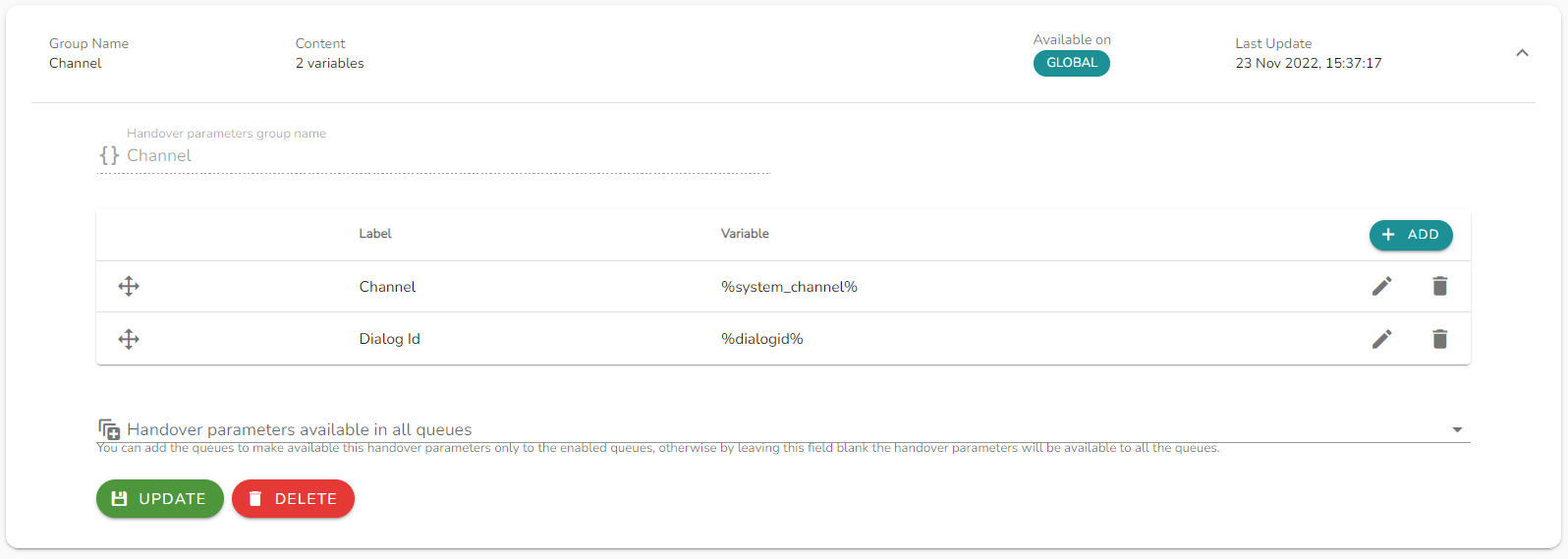
A group named Channel with two variables:
| Label | Variable |
|---|---|
| Channel | the channel in use (e.g., webchat, whatsapp) |
| Dialog id | the unique ID of the chat session |
No queues selected → available for all queues. At handover, the agent sees both labels with their resolved values for that specific conversation.
Notes and limitations
- Variable values are resolved at the moment of handover from the active conversation context.
- Variables that cannot be resolved will appear empty in the agent view.
- Changing a group's variable list does not affect handovers already in progress.