Agent Profiles - Configure Queues and Task Capacity in ConvyAI
Overview
A profile is a configuration template that you assign to agents. It defines:
- which queues the agent will receive tasks from;
- how many concurrent chat and email tasks the agent can handle at the same time.
Each agent can be assigned to only one profile. Multiple agents can share the same profile.
Prerequisites
- At least one queue must exist before creating a profile. See Queues.
Create a profile
Navigate to ConvyAI Agents → Profiles and click New Profile.
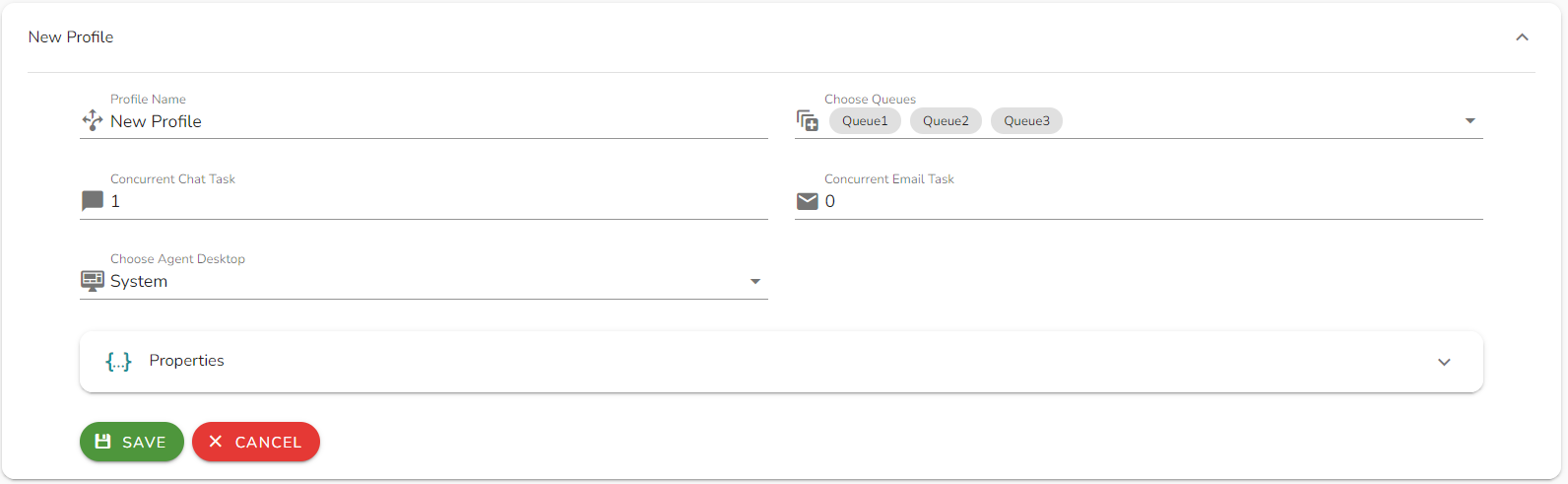
Configuration options
| Field | Description |
|---|---|
| Profile Name | A unique name to identify this profile. |
| Choose Queue | Select one or more queues this profile handles. Agents assigned to this profile will receive tasks from all selected queues. |
| Concurrent Task Chat | Maximum number of live chat (including social channels and web chat) tasks an agent can handle at the same time. Set to 0 to prevent agents from receiving any chat or social task. |
| Concurrent Email Task | Maximum number of email tasks an agent can handle at the same time. Set to 0 to prevent agents from receiving any email task. |
Click Save to create the profile.
Notes and limitations
- Setting both Concurrent Task Chat and Concurrent Email Task to
0makes the profile effectively unusable - agents assigned to it will not receive any task. - Changing the concurrent task limits on a profile affects all agents currently assigned to it immediately.
- A profile cannot be deleted if agents are currently assigned to it. Reassign the agents first.