Agent Profile Settings - Configure Your Account in ConvyAI Agent Desktop
Overview
The Agent Profile Settings panel is accessible from the bottom of the left navigation menu. It shows your logged-in user information and lets you configure personal preferences.
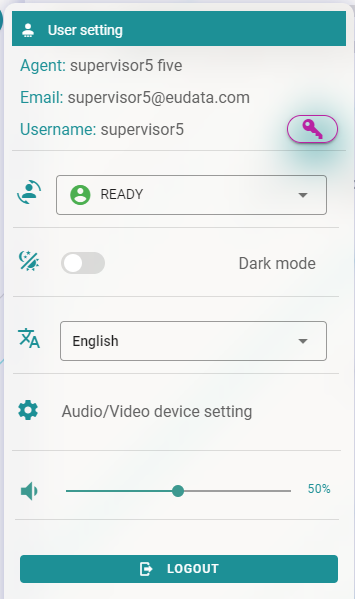
Agent status
From this panel, you can toggle your availability status:
- Ready - you are available to receive new tasks.
- Not Ready - you will not receive new tasks.
At login, the system automatically sets your status to Not Ready. Switch to Ready when you are ready to start handling conversations.
Theme
Switch between light and dark mode to match your preference or work environment.
Language
Select the interface language. Currently supported languages:
- English
- Italian
Notification volume
Adjust the volume of the alert notification sound. The default is set to 50%.
Changing your password
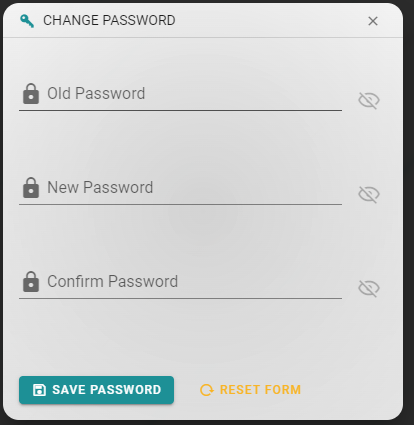
Next to your username, a key icon opens the password change dialog.
- Enter your current password.
- Enter your new password.
- Click Save.
The password is updated immediately.
Logging out
Always use the Logout button at the end of your working day instead of simply closing the browser window. This ensures your session is properly closed and you are not counted as available by the system.
Click the Logout button in the Agent Settings panel to sign out of the Agent Desktop.