Outbound Bot - Create a Dedicated Bot for Outbound Flows in ConvyAI
Overview
An outbound bot is a dedicated bot type in ConvyAI designed to handle the conversational logic triggered by outbound campaigns. It defines how the platform responds when customers reply to outbound messages.
Create an outbound bot
Navigate to Outbound → Bot and click + to create a new bot.
Fill in the following fields:
| Field | Description |
|---|---|
| Name | A unique name for this outbound bot. |
| Initial flow | The flow that will be executed when the bot is triggered. |
Configure the flow
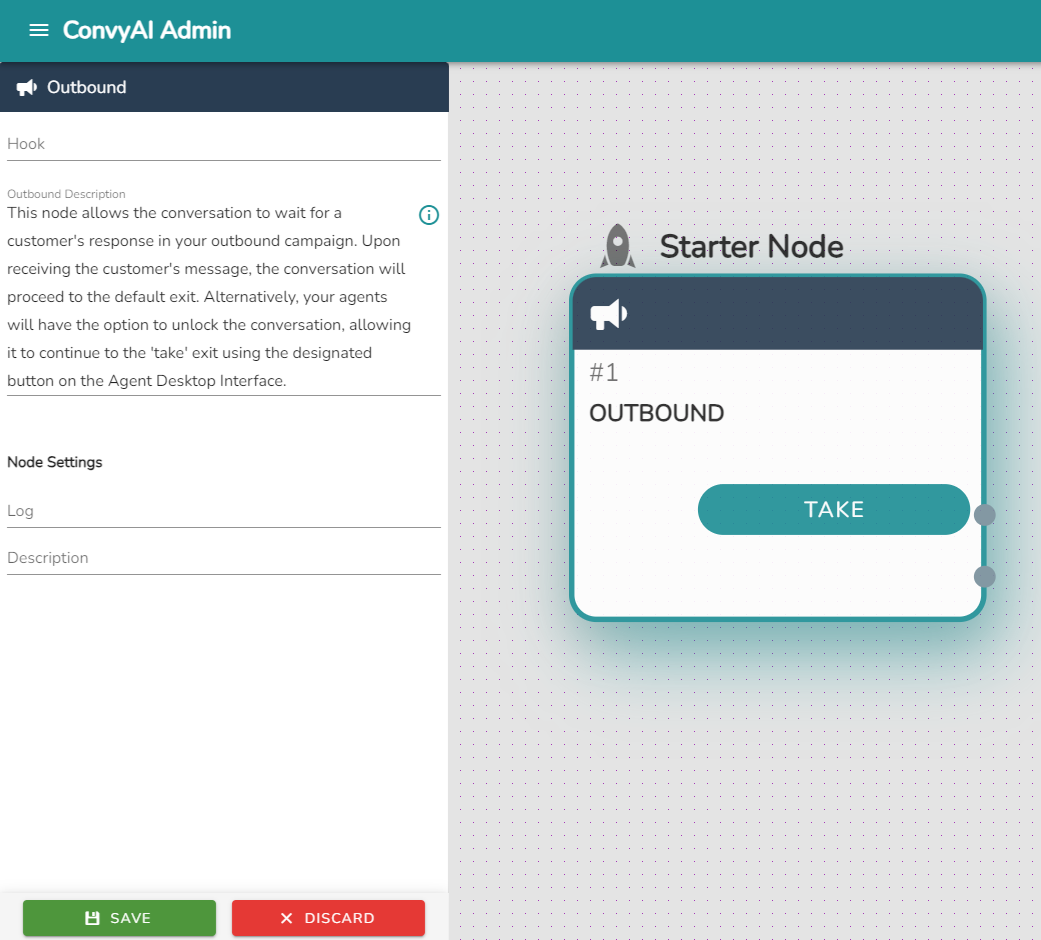
Once you enter the flow, the first node is preset and locked - it cannot be modified. This node represents the outbound entry point.
Take exits
The locked first node has two exits:
| Exit | Description |
|---|---|
| Take (first) | Routes the conversation directly to an operator for handover. Triggered when agent intervention is required. |
| Default | Activated when the customer responds to the message sent through the outbound campaign. Handles the automated conversational flow. |
tip
Set up a Handover node on the Take exit (first exit) to route conversations to the appropriate agent queue when direct operator assistance is needed.