Knowledge Base Node - RAG Responses in ConvyAI FlowDesigner
Overview
The Knowledge Base node is a GenerativeAI category node in the FlowDesigner. It uses the configured AI Model to understand the user's intent, optionally retrieve relevant content from a Knowledge Base index, and generate a contextual response - all within a single node.
Add it to any flow at the point where you want the LLM to handle user input. You can combine it with any other node type, keeping full control over the conversation structure while delegating natural language understanding and response generation to the model.
Prerequisites
- A configured AI Model.
- An indexed Knowledge Base (required for RAG responses; optional for intent-only flows).
Node configuration
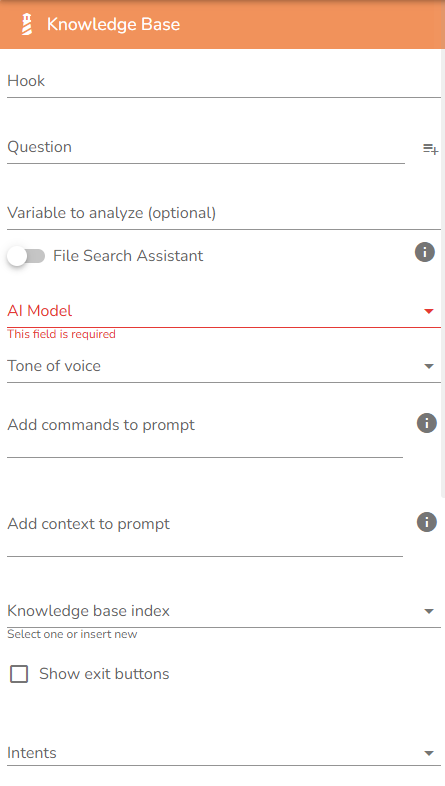
| Field | Description |
|---|---|
| Question | The text shown to the user to start the conversation. |
| AI Model | The generative AI model used to analyze the user's request. See AI Models. |
| Tone of voice | Defines the response style adopted by the bot. Options: Empathetic, Professional, Friendly. |
| Add commands to prompt | Specific instructions to give to the model to define a particular behavior (e.g., language constraints, formatting rules, fallback handling). |
| Add context to prompt | Additional context to extend the bot's knowledge domain. Useful for passing customer information gathered earlier in the conversation directly into the prompt. |
| Knowledge base index | The Knowledge Base index used to contextualize the responses. If left empty, no RAG retrieval is performed. |
| Show exit buttons | Enable to present the end user with a guided button menu as an alternative to free-text input. |
| Intents | Selection of intents defined in the chosen AI Model. When the user's request is classified with one of the selected intents, the flow continues through the corresponding exit node. |
| Send generated answer to user | When enabled, the bot automatically displays the LLM-generated response to the customer. |
| Set maximum number of interactions | Sets the maximum number of exchanges between the user and this node before the conversation exits to the next node. Use this to prevent open-ended loops and direct the flow toward more controlled navigation. |
Knowledge Base options
When a Knowledge base index is selected, two additional options become available:
- Show source document URL - Displays a link to the source document alongside the generated response. A custom URL prefix can be configured.
- Retain conversation memory - The context extracted from each interaction is carried forward into subsequent interactions within the same session. This improves response contextualization over multi-turn conversations.
Intent routing
When intents are configured on the selected AI Model, the node exposes one exit per intent plus a default exit. The flow routes to the corresponding branch when the model classifies the user's message with a confidence score above the configured threshold.
| Exit | Description |
|---|---|
| Intent exits | One per selected intent. Triggered when the user's message matches that intent above the threshold. |
| Default exit | Triggered when no intent matches or the confidence score is below the threshold. The LLM response is still generated and shown to the user if Send generated answer to user is enabled. |
| Max interactions exit | Triggered when the maximum number of interactions is reached. Use this exit to route the conversation to a different flow or node. |
Notes and limitations
- Add context to prompt is the recommended way to pass dynamic values into the prompt. Use a preceding node to collect variable data and reference it here.
- The Knowledge Base node counts as a single LLM call per user message, regardless of how many chunks are retrieved.
- Intent classification and response generation are performed in the same LLM call.