Document Management - Manage Your Knowledge Base Content in ConvyAI
Overview
The Document Management page gives you visibility into what is currently indexed in your Knowledge Base. For each index, you can see the documents or website pages that have been processed, search within them, and remove individual entries or entire knowledge domains.
Navigate to Generative AI → Document Management.
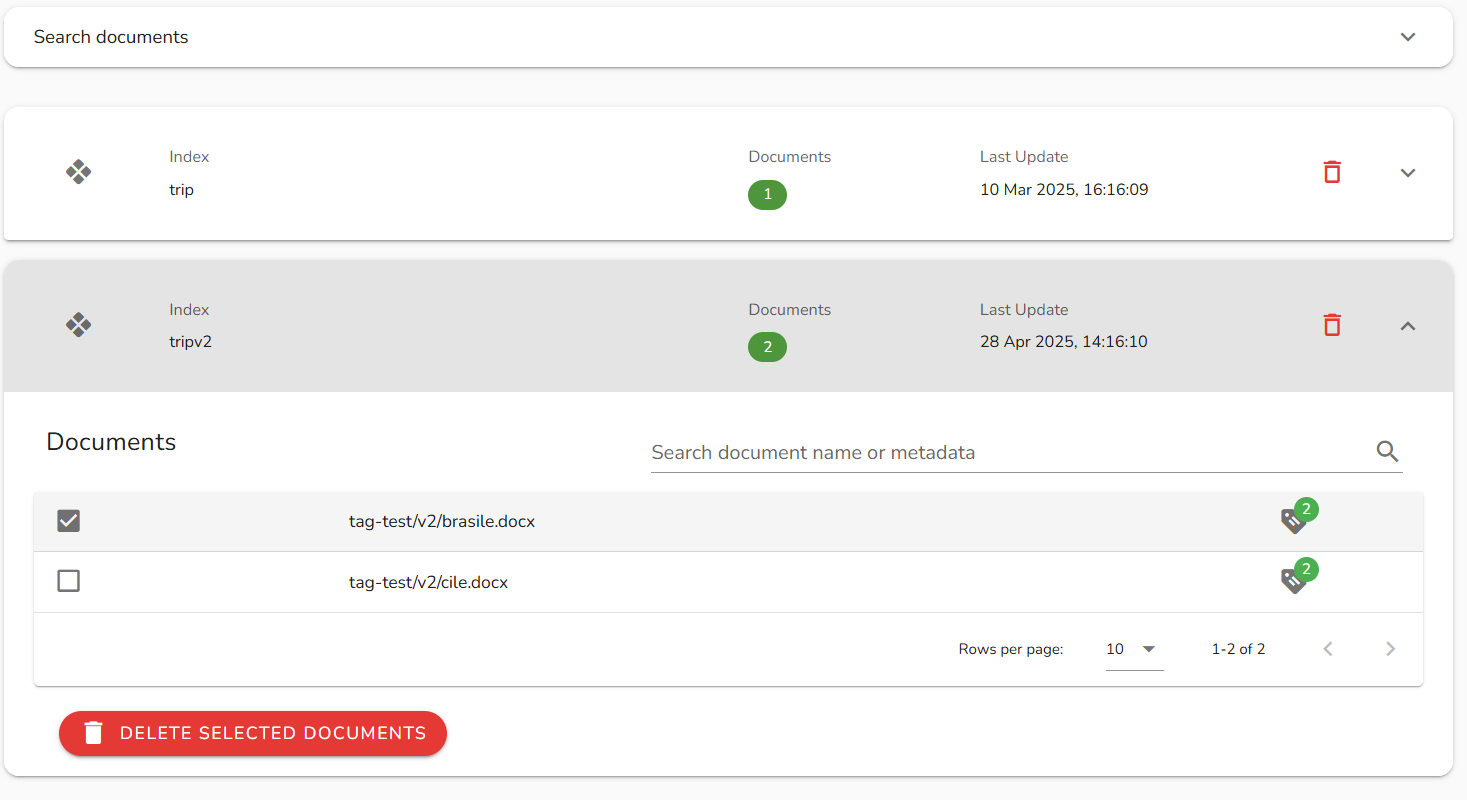
View indexed content
The page displays all configured indexes. Expand an index to see the list of documents or pages it contains. Each entry shows the source identifier (file name or URL) and indexing metadata.
Use the search field to filter documents by name or URL within a specific index.
Remove content
Remove a document or page
Select a specific document or page and click Delete. The entry is removed from the Knowledge Base index - the bot will no longer be able to retrieve information from it.
Remove a knowledge domain
To remove an entire index and all its content, delete the knowledge domain. This is irreversible.
Deleting a knowledge domain removes all indexed content associated with that index name. Bots configured to query that index will no longer return knowledge-based responses until the index is repopulated.
Notes and limitations
- Deleting a document indexed from an AWS S3 bucket does not delete the physical file from the bucket. It only removes the document's indexing within the Knowledge Base. The original file remains untouched in S3.
- To re-index a deleted document, run a new indexing batch pointing to the same source.