MCP Servers in the AI Agent Node - ConvyAI
Overview
MCP servers (Model Context Protocol Servers) are components that expose external tools, data, or functionalities to an AI model through the Model Context Protocol. They act as a bridge between the LLM and third-party systems - APIs, databases, internal services - allowing the model to call functions or access information in a structured and secure way.
This separation makes it straightforward to extend the model's capabilities without embedding external logic directly into the prompt or the flow.
Configure MCP servers
In the MCP Server List section of the AI Agent node, add one or more external MCP servers.
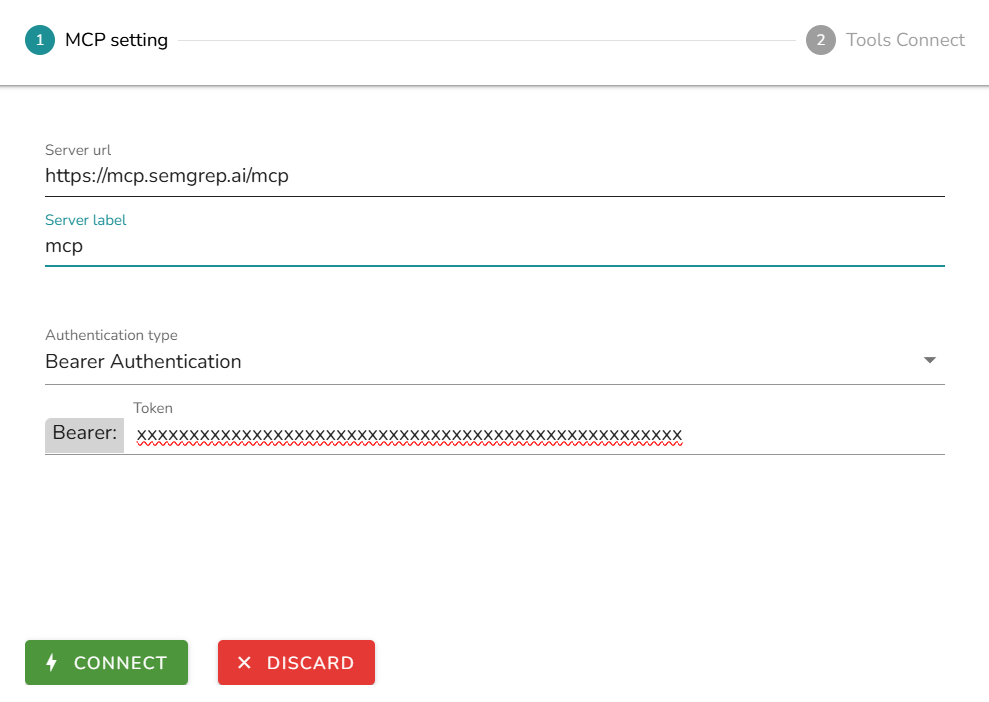
| Field | Description |
|---|---|
| Server URL | The endpoint of the MCP server. |
| Server Label | An internal label for identification within the node. |
| Authentication type | The authentication method: None (no authentication required), Bearer Authentication (passes a bearer token in the Authorization header), or Custom Headers (define one or more custom key/value header pairs). |
Tool selection
After connecting an MCP server, select which tools to expose to the model. Each tool has its own description that the model uses to decide when to invoke it.
If no tools are selected, the system automatically treats all tools available on the connected servers as active.
Tool detail
For each tool exposed by the server, you can expand its detail view to inspect:
- Description - the natural language description of the method, which the model uses to decide when to invoke it.
- Input parameters - the list of parameters the method accepts, including name, type, and description for each.