AI Agent Node - Configuration in ConvyAI FlowDesigner
Overview
The AI Agent node is the FlowDesigner component that exposes AI Agent capabilities inside a flow. Add it at any point in a flow where you want the LLM to process input, invoke tools, and produce an output that drives the next step.
Node configuration
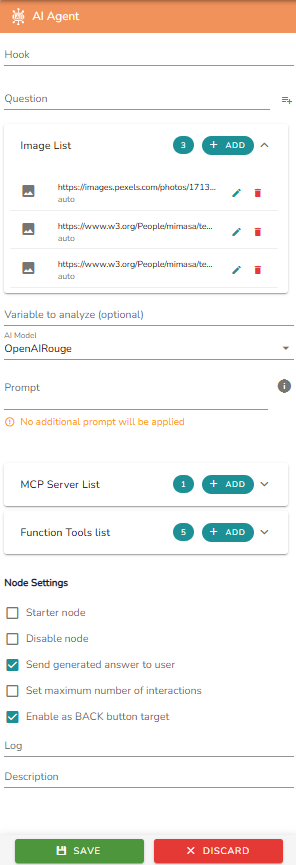
| Field | Description |
|---|---|
| Hook | Optional label to link the node to a specific event or use it as a jump target. |
| Question | The main question or instruction sent to the AI model. |
| Image List | Attach images to be analyzed as part of the prompt. See Image Analysis. |
| Variable to analyze | Optional variable passed as additional input to the model. |
| AI Model | The AI Model used to generate responses. |
| Prompt | System-level instructions to enrich the context. There is no separate system prompt for this node type - instructions are passed directly via this field. |
| MCP Server List | Connect one or more external MCP servers. See MCP Servers. |
| Function Tools List | List of custom JavaScript functions the AI can invoke. See Callable Functions. |
| Node Settings | Operational settings: initial node flag, maximum number of interactions, and additional toggles. |
Notes
- The Question field supports dynamic variable interpolation. Use it to pass context gathered earlier in the flow directly into the model's input.
- Variable to analyze is a dedicated input for passing the value of a previously populated flow variable directly to the model.
- The AI Agent node counts as a single LLM call per execution, regardless of the number of tools invoked.
- If no tools are selected in the MCP Server List, all available tools from the connected servers are treated as active.