Callable Functions in the AI Agent Node - ConvyAI
Overview
The AI Agent node supports Function Tools - user-defined JavaScript functions that the model can invoke during execution. Functions extend what the AI can do within a flow: validate data, perform calculations, extract structured values, call external services, or transform input before generating a final response.
Functions:
- Accept parameters defined via JSON Schema
- Can execute custom logic (validations, calculations, data extraction)
- Return output that the AI uses in its final response
- Support standard and
asyncfunctions - Allow
fetchfor HTTP calls andconsole.logfor debugging
Function configuration
Open the Function Tools List section in the AI Agent node and add a new function.
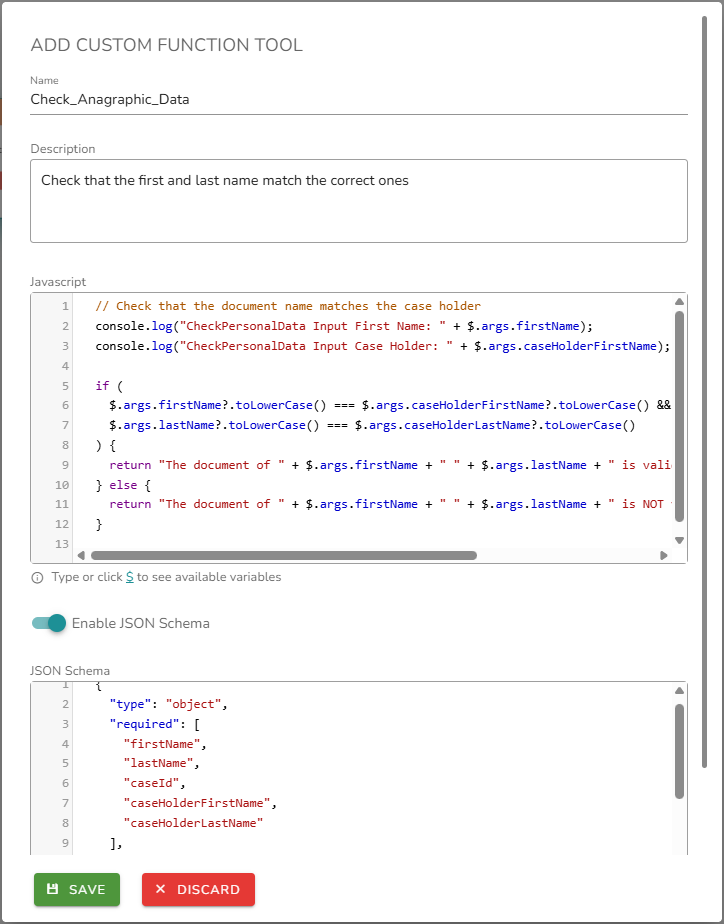
Each function is configured through a modal with the following fields:
| Field | Required | Description |
|---|---|---|
| Name | Yes | Unique identifier for the function. |
| Description | Yes | Natural language description used by the model to decide when to invoke the function. |
| Code JS | Yes | The JavaScript implementation. |
| Input schema JSON | No | JSON Schema definition of the function's input parameters. |
Code editor
The function code editor is built on CodeMirror and includes the following features:
| Feature | Description |
|---|---|
| Syntax highlighting | Code is highlighted according to JavaScript syntax. |
| Hint & autocomplete | Typing $ opens an autocomplete menu with available variables and objects. Continue typing to filter (e.g., $.vars shows only vars-compatible values). |
| Automatic validation | Code is validated in real time. Syntactic and structural errors are detected immediately. |
| Error reporting | Errors appear as markers in the left margin. Hovering over a marker shows a tooltip with the error description (e.g., Unexpected token, Missing bracket). |
| Save guard | Saving is blocked if blocking errors are present. The function can only be saved when the code is valid. |
Variable autocomplete
The editor provides an autocomplete system activated by typing $. A hint below the code block reminds the user of this shortcut. Pressing $ opens a contextual menu with all available variables and a search box; selecting a variable inserts it at the cursor position.
Available variable categories:
| Variable | Description |
|---|---|
$.args | Object containing the arguments passed to the function at call time, as defined in the input schema. |
$.input | Object containing the user's question (question field) and any files passed as input (attachments field). |
$.context | Execution context: current bot ID and name, communication channel, conversation ID, and related metadata. |
$.entities | Object containing the flow variables defined in the current execution environment. |
JSON Schema input definition
Input parameters are defined using JSON Schema. Variables declared in the schema are accessible inside the function via $.args.
{
  "type": "object",
  "properties": {
    "orderId": {
      "type": "string",
      "description": "The order ID to look up."
    },
    "language": {
      "type": "string",
      "enum": ["en", "it", "fr"]
    }
  },
  "required": ["orderId"]
}
Inside the function, access these values as $.args.orderId and $.args.language.