Handover to Agents - Route Customers from Bot to Queue in ConvyAI
Overview
The Handover node is a terminal node that transfers the customer conversation from a bot flow to a human agent. When the node is reached, the conversation is placed in a queue and assigned to the first available agent matching the routing rules.
This node connects the automated side of ConvyAI with the contact center module. For the handover to succeed, the target queue must be configured and have available agents. See Queues and Agents.
Prerequisites
- At least one queue configured in the Contact Center section.
- Agents assigned to that queue via a profile.
Configure the handover node
Add a Handover node from the Terminal category in the Flow Designer.
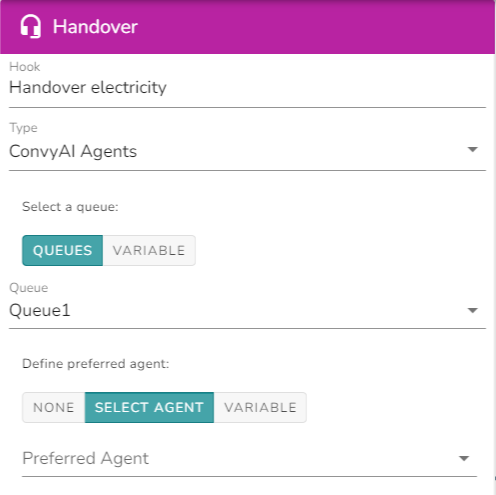
Queue and preferred agent
| Field | Description |
|---|---|
| Queue | The destination queue for this handover. Select from the dropdown or provide a variable containing the queue ERI as value. |
| Preferred agent | Optional. If set, the system attempts to assign the conversation to this specific agent first. Select from the dropdown or provide a variable with the agent ERI. If the preferred agent is unavailable, the standard queue routing applies. |
Priority
Conversations in a queue are sorted by priority. Higher priority conversations are assigned to agents first.
| Field | Description |
|---|---|
| Priority | Set a fixed level - Normal (0), High (2), Critical (4) - or provide a variable with a numeric value. The higher the number, the higher the priority. |
Priority values are not limited to the three presets. Any positive integer can be set via variable. A conversation with priority 5 will be routed before one with priority 4.
Post-handover flows
After the handover node fires, three outcomes are possible. You can assign a specific flow to handle each one:
| Outcome | When it triggers | Typical use |
|---|---|---|
| Inactivity | The customer does not interact for the configured timeout period. The conversation is de-assigned from the agent until the customer responds again. | Show a waiting message, re-route to a bot, or retry with the previous agent as preferred. |
| Error | The queue timeout expires with no agent picking up the conversation. | Re-enqueue with different priority, offer a callback, or inform the customer the service is unavailable. |
| End of handover | The handover completes successfully and the agent closes the conversation. | Trigger a satisfaction survey, display a closing message, or collect feedback. |
Notes and limitations
- The inactivity timeout is defined at queue level, not in the handover node itself. See Queues for configuration details.
- If no post-handover flow is configured for a given outcome, the conversation simply ends.
- When using variables for queue or agent ERI, the variable must be populated earlier in the flow before the handover node is reached.