Website Integration - Embed the ConvyAI Bot on Your Website
Overview
After creating a web chat connector, generate an HTML snippet and include it on the pages of your website where you want the bot to appear. The snippet loads the ConvyAI web chat interface and connects it to the configured bot.
Generate the HTML snippet
In the connector settings, click Generate HTML snippet.
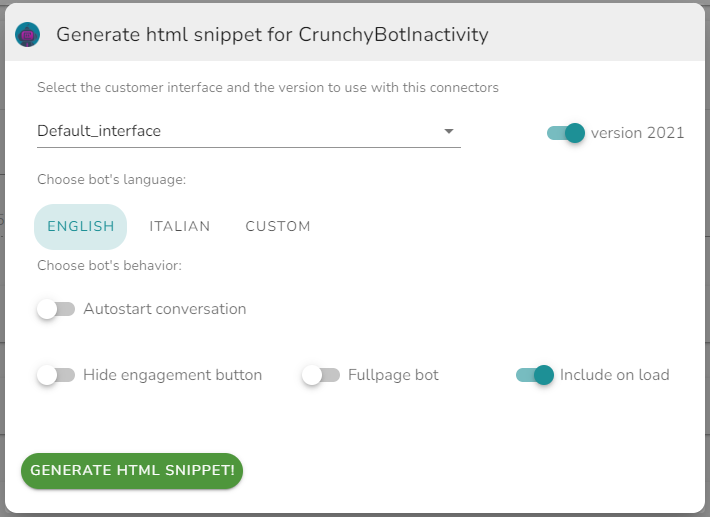
Configure the following before generating:
| Option | Description |
|---|---|
| Interface | The visual theme or layout to use for the chat widget. |
| Bot language | The language in which the bot will communicate with the customer. |
| Bot version | Select the interface version. The 2021 bot version exposes additional behavioral options (see below). |
Click the green button to generate the snippet, then paste it into the <head> or before the closing </body> tag of your HTML page.
2021 bot version behaviors
When the 2021 bot version is selected, the following behavioral options become available:
| Option | Description |
|---|---|
| Autostart conversation | Automatically starts the conversation when the script is loaded into the page, without waiting for the customer to click the engagement button. |
| Autostart delay | Used together with Autostart conversation. Sets a delay in milliseconds between script load and conversation start. |
| Hide engagement button | Hides the engagement button. Requires Autostart conversation to be enabled, or a custom integration using the Web SDK. |
| Fullpage bot | The bot interface fills the entire page. Suitable for totem or kiosk deployments. |
| Include on load | Includes the bot UI automatically when the page loads. If disabled, the UI is injected only when the script is dynamically loaded. |
The generated snippet looks like this:
<script
  type="text/javascript"
  src="https://your-instance.example.com/convy/static/include_v2/interfaces/CustomerGUI2021/includeConvyAI_v1.js?rnd=xxxxxxxxxx&publicationId=xxxxxxxx-xxxx-xxxx-xxxx-xxxxxxxxxxxx&lang=en&ui=xxxxxxxxxx">
</script>
| Parameter | Description |
|---|---|
rnd | Random token generated at snippet creation. Do not modify. |
publicationId | Unique identifier of the web chat publication. |
lang | Language code for the bot interface (e.g. en, it). |
ui | Internal identifier of the selected interface theme. |
fullpage | Set to true to enable fullpage mode. Omit or set to false for the standard widget. |